Studio
Plans, usage and limits
Watch it
What each plan includes, how listening time, credits and licensed lookups are counted, and what happens when one runs out. For church owners, admins and booth operators.
The plans
| Free | Starter, $39 a month | Growth, $69 a month | Network | |
|---|---|---|---|---|
| Live detection | none | 20 hours a month | 50 hours a month | sized with you |
| Licensed lookups | none | 500 a cycle | 2,000 a cycle | sized with you |
| Licensed translations | none | every one Synkeet offers | every one Synkeet offers | every one Synkeet offers |
| Free translations from the library | none | 100+ | 100+ | 100+ |
| Outputs | 1 | 2 | 5 | sized with you |
| Team members | 2 | 5 | 15 | sized with you |
| An idle room screen | the Synkeet mark | your logo | your logo | your logo |
| Also | public-domain scripture, still themes | Aura read-aloud, live motion, ProPresenter, split screen | every theme, Planning Center | multi-campus, all-campus projection, dedicated support |
Plans and trials
Every paid plan includes every licensed translation Synkeet offers, such as NLT and The Message. There is no limit on how many are enabled at once on Admin, Translations.
KJV, WEB, ASV and BSB are built in on every plan, Free included. Every plan keeps the full projection history.
Choosing a plan
- Starter and Growth start from Admin, Plan & usage (Choose Starter, Choose Growth).
- Network is not self-serve. Write to hello@synkeet.com.
The 30-day trial
Your first church begins on a 30-day Growth trial. When it ends, the church drops to Free unless you subscribe.
A church that signed up on synkeet.com gave a card at sign-up, and its trial turns into the paid plan on the day it ends. Plan & usage names the day its plan starts billing. Manage subscription and Cancel subscription are there during the trial.
Canceled before that day, the card is not charged and the church drops to Free when the trial ends.
Team seats
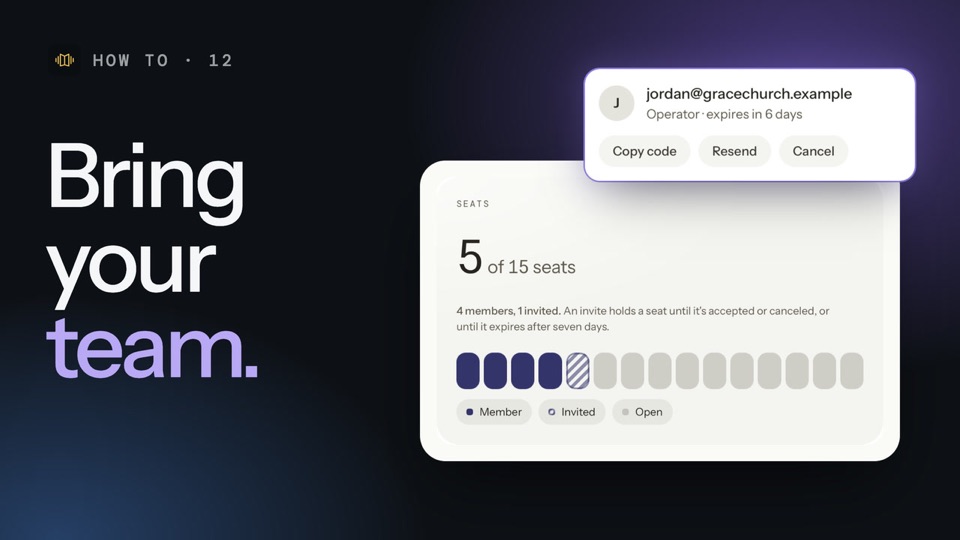
A seat is a member or an invitation still open.
- An invitation holds its seat until it is accepted or canceled, or until it expires seven days after it was sent.
- An expired invitation is gone from Admin, Team and frees its seat everywhere, so you can invite someone else.
- Admin, Team, Overview and Plan & usage count seats the same way. They change as soon as you invite, cancel or remove someone on Team.
Listening time
Live detection is counted from the minute the microphone opens to the minute it closes, whether or not anyone is speaking. The allowance resets on the 1st of each month and does not carry over.
Admin, Plan & usage, Listening shows the minutes used this month.
For a sense of scale:
- Microphone open for the sermon only, two services a week: about six hours a month.
- Microphone open for whole services plus a midweek study: about twenty.
When it is used up, the booth says: "This month's listening time is used up. Verses can still be pushed by hand, and the allowance resets on the 1st. Listening credits can cover the rest of the month if you turn them on."
The microphone closes itself
After 15 minutes with nothing said, listening stops and the transcript says why. A console left open after a service would otherwise spend the allowance on an empty room. Press Start Capture again when the service resumes.
For a worship set in the middle of a service, press Worship beside Stop instead. Listening pauses, no time is spent, and the service stays open until you press Resume, for up to 90 minutes.
Good to know.
- A service record ends after thirty minutes with neither a verse nor anything heard, unless listening is paused for worship. That is separate from the microphone closing.
Listening credits
Find them at Admin, Plan & usage, Listening credits (paid plans). They are off by default: a church that has not opted in simply stops listening when the allowance is gone.
- Only an owner or admin can turn on Use credits when the allowance runs out and set Most this month may use, a ceiling the month never exceeds.
- Credits are drawn only after the allowance, and unused credits carry over.
- Turn it on before a Sunday. An operator at the desk cannot.
Rehearsal
Credits are for services. A rehearsal (Rehearse in Studio) listens on the monthly allowance only and never draws credits.
Once the allowance is used up, rehearsal listening is refused with "Rehearsal uses this month's listening hours, which are used up. Bought minutes are kept for services. You can still rehearse by pushing verses by hand."
Good to know.
- Rehearsal minutes still count toward the allowance like any other listening.
- A rehearsal that starts with a little time left is not cut off when the hours run out.
- The minutes it listens past the allowance are never paid from credits, then or at the next service.
- Once you go live, the minutes are the service's again. Past the allowance they are drawn from credits as usual, if credits are turned on.
Buying minutes
Buy minutes, on the same card, lists the packs on sale, each with its minutes and price.
- Growth and Network churches buy them, from an owner or admin account. On Starter the card says top-ups come with Growth.
- Choosing a pack opens checkout in the browser.
- The minutes join the balance once the payment clears.
- The card shows the new balance when you come back to Synkeet.
Good to know.
- Buying does not switch credits on or change the ceiling.
- Taper hosts on Plus buy the same way from their plan page on the web. The Taper phone app does not sell anything.
Licensed lookups
Each verse fetched from the library counts once a cycle, in a licensed translation or a free one. The built-in KJV, WEB, ASV and BSB never count.
Near the limit a banner appears in the booth. When spent it reads "Licensed lookups exhausted. Public translations (KJV, WEB, ASV, BSB) keep working".
In Admin, Scripture status shows:
- The count against the limit.
- The date it began and the date it starts over.
- One column for each day of the cycle, with today marked.
- Once a few days have passed, about how many you will have used by the reset at your pace so far.
When the limit is reached it says when, and what to do until the count starts over.
Free plan
Start Capture is off and the transcript panel says "Live transcription is not on this plan".
Everything else works: search, the navigator, cues, service plans, slides, one output, public-domain translations. Prepare passages in the Service tab before the service and fire them as the reader goes.
While the room screen waits it shows the Synkeet mark, with your idle message under it if you wrote one. Your own logo there is included from Starter.
Billing states
| State | What you see |
|---|---|
| Past due | The plan page says your last payment needs attention. Update billing. |
| Canceled | The plan stays until the end of the paid period, then the church is on Free. |
The booth re-reads the plan every five minutes, so a change reaches it within that window. If listening is no longer included, capture stops and says so.
A badge in the top bar reading "Free · check billing" means the plan you pay for and the plan the booth is serving differ. Open Plan & usage.
Steward
Guides are free on every plan. Questions to Steward are metered per church, and every operator draws from the same pool: 15 a month on Free, 150 on Starter, 300 on Growth, 1,000 on Network.
When a figure could not be read
If Synkeet could not read a figure just now (seats, members, invitations, licensed lookups, listening or listening credits), Admin shows Could not be read just now in its place instead of 0. On Overview the tile reads Unavailable.
Press Try again where it is offered, or open Admin again, to read it again. Your plan's limits still apply as usual.
A Taper host's Listening credits, on the plan page on the web, says the same when it could not be read, with Try again.